The Environmental Public Notice application offers a simple way for users to locate public notices and information about the notices near a location of interest. To identify a location, simply click on the map, enter an address in the search box, or use your current location.
Finding an Area of Interest
There are three primary ways to identify a search location of interest:
Interact directly with the map by clicking any spot on the map
Use the Geolocate Button to search by your current physical location
Use the Search Bar to search by a specific address
Notice Types
All Notices
Statewide
Bureau of Air Quality
Bureau of Land and Waste Management
Bureau of Coastal Management
Bureau of Water
Notice Popup Attributes
Applicant
Name of the permit applicant
Notice Type
Type of public notice
Longitude / Latitude
Coordinates of the notice
Location Accuracy
Specific (matched address) or Generalized (ZIP Code centroid)
Notice Location
Site specific, citywide, countywide, or statewide
Start / End Date
Active dates of the notice
More Info
Link to detailed information about the notice
Share Your Map
Click the Share button in the header to share your map via email, Facebook, or Twitter.
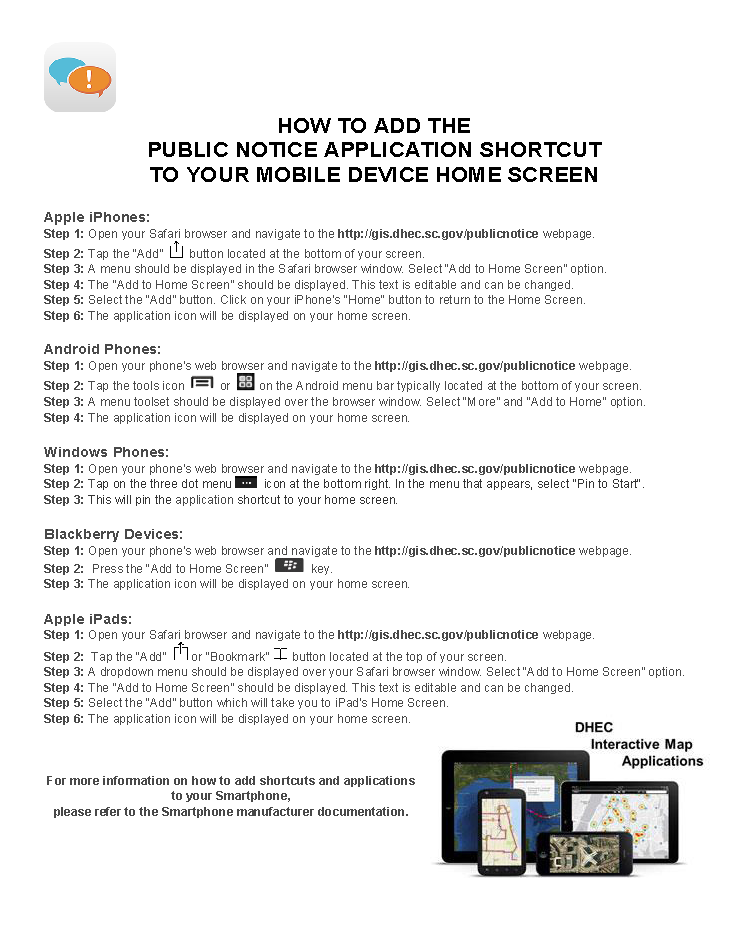
Mobile Shortcut
Environmental Public Notices
South Carolina Department of Environmental Services
📍
Search or click any spot on the map to find public notices nearby.
📋
Browse results in the right panel, grouped by bureau and distance.
🔍
Filter by date, status, or agency using the Filters button.
ℹ️
Click any notice on the map or in the list for full details.


 to search by your current physical location